For simple ride tracking, the CatEye Velo 7 is my best overall pick: its wired setup keeps the basics straightforward without adding wireless pairing. The CATEYE Padrone stands out if a large display matters more than compact size, while the CatEye Velo Wireless suits riders who want a cleaner-looking installation. The main choice is between wired reliability and wireless convenience, with display size and setup complexity also separating these models. None is a GPS computer, so expect basic ride data rather than route maps or phone-connected training tools. Read on for the full breakdown and the right match for your bike.

Get bike and ride gear delivered free with Prime
- Fast, free delivery on millions of items
- Prime Video, Amazon Music and more included
- Member-only deals all year
Key Takeaways
- CatEye Velo 7 leads for straightforward tracking: its wired design favors a simple, dependable setup over a cable-free cockpit.
- The Padrone prioritizes legibility: its larger display is the standout for riders who want to glance at ride data without squinting.
- Wireless models trade a cleaner installation for more setup needs: sensor placement and battery checks matter more than with a wired option.
- The Velo Wireless and Urban Wireless serve different preferences: compare their display and form factor against your cockpit space and preferred readout.
- Hilceriy and SY offer alternative entry points, but brand familiarity and setup details vary: check the included sensor arrangement and instructions before choosing.
| Hilceriy Wired Bike Computer and Odometer |  | Best for Extra Ride Metrics | Brand and model: Hilceriy BPSPT-1 | Display: LCD | Connectivity: Wired | VIEW ON AMAZON | See Our Full Breakdown |
| SY Wireless Bicycle Speedometer and Odometer with LCD Display | 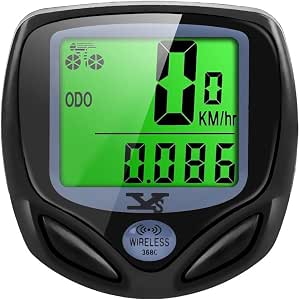 | Best for a Simple Wireless Setup | Display: 1.2-inch LCD with backlight | Connectivity: Bluetooth listed in product data | Tracked data: Speed, distance, and riding time | VIEW ON AMAZON | See Our Full Breakdown |
| CatEye Velo 7 Wired Bike Computer |  | Best for Beginners | Display: 2.17-inch LCD | Connectivity: Wired | Sensor: Magnet-based speed sensor | VIEW ON AMAZON | See Our Full Breakdown |
| CATEYE Padrone Wireless Bike Computer |  | Best for a Large, Easy-to-Read Display | Display: 5.5 cm LCD | Connectivity: Analog wireless | Wireless transmission range: 70 cm | VIEW ON AMAZON | See Our Full Breakdown |
| CatEye Velo Wireless Bike Computer |  | Best for More Data Without Wires | Display: LCD | Connectivity: Proprietary wireless | Sensor: Speed sensor | VIEW ON AMAZON | See Our Full Breakdown |
| CATEYE Urban Wireless Bike Computer |  | Best for Extra Ride Stats | Display: LCD | Connectivity: Analog wireless | Sensor: Speed sensor | VIEW ON AMAZON | See Our Full Breakdown |
| analog cycling computers for simple ride tracking | Display | Connectivity | Tracked data | Mounting |
|---|---|---|---|---|
| Hilceriy Wired Bike Computer a | LCD | Wired | Speed, average and maximum speed, riding time, distance, calories, and temperature | Handlebar mount |
| SY Wireless Bicycle Speedomete | 1.2-inch LCD with backlight | Bluetooth listed in product data | Speed, distance, and riding time | Handlebar mount |
| CatEye Velo 7 Wired Bike Compu | 2.17-inch LCD | Wired | Current, maximum and average speed; total and trip distance; elapsed time; pace arrow; clock | Handlebar mount |
| CATEYE Padrone Wireless Bike C | 5.5 cm LCD | Analog wireless | Current, maximum and average speed; distance; elapsed time; clock | Tool-free FlexTight handlebar mount |
| CatEye Velo Wireless Bike Comp | LCD | Proprietary wireless | Current, maximum and average speed; distance; ride time; calorie consumption | Handlebar mount with zip ties |
| CATEYE Urban Wireless Bike Com | LCD | Analog wireless | — | — |
More Details on Our Top Picks
Hilceriy Wired Bike Computer and Odometer
The Hilceriy earns its place for riders who want more than the basic speed, distance, and time shown by the SY Wireless Bicycle Speedometer and Odometer. It adds average and maximum speed, calories, and temperature, making it a better fit for riders who like a fuller snapshot of an everyday ride without moving to GPS. Its wired sensor avoids wireless pairing, while the IPX6 water resistance offers more rain protection than the SY’s IP54 rating. A manually activated backlight helps when checking the display in dim conditions, and auto wake-up resumes tracking after standby. The tradeoff is a wire that can limit tidy placement, plus uncertain compatibility with some electric-assist bikes. Heavy rain may also affect temperature readings, so that metric is less dependable in poor weather.
Pros:- Tracks speed, average and maximum speed, distance, riding time, calories, and temperature
- IPX6 water resistance offers strong protection for wet-weather rides
- Manual backlight supports viewing in dark areas
- Auto wake-up resumes tracking after standby
Cons:- Wired sensor limits placement flexibility compared with wireless options such as the SY
- Compatibility may vary with electric-assist bicycles
- Heavy rain can affect temperature readings
Best for: Road, mountain, or folding-bike riders who want speed, distance, ride time, and extra readouts such as calories and temperature without GPS.
Not ideal for: Electric-assist bike owners who have not confirmed sensor compatibility, and riders who prefer a wireless setup or need dependable temperature readings in heavy rain.
- Brand and model:Hilceriy BPSPT-1
- Display:LCD
- Connectivity:Wired
- Tracked data:Speed, average and maximum speed, riding time, distance, calories, and temperature
- Water resistance:IPX6
- Mounting:Handlebar mount
- Dimensions and weight:0.82 × 2.35 × 1.76 in; 0.08 kg
- Warranty:One year
Our verdict“Choose the Hilceriy if you want a wired, rain-ready computer with more ride metrics than the simpler SY, and skip it if wireless installation matters more.”
SY Wireless Bicycle Speedometer and Odometer with LCD Display
The SY is a straightforward choice for riders who want speed, distance, and ride time without routing a wire along the bike. Its movement-activated wake-up keeps the routine simple, while the backlit LCD is useful on dim commutes. Compared with the wired CatEye Velo 7, this model offers wireless installation but fewer listed ride metrics: it does not provide the Velo 7’s maximum and average speed, trip and total distance, or pace arrow. The tradeoff is modest IP54 water resistance, below the Hilceriy’s IPX6 rating, and the supplied details flag possible limits with some electric-assist bikes. A slight rattle during use may also bother riders seeking a quiet, firmly settled cockpit. It makes the most sense when uncomplicated wireless tracking matters more than a broad data set.
Pros:- Tracks the core measures of speed, distance, and riding time
- Wireless sensor avoids routing a cable along the bike
- Backlight helps with low-light viewing
- Automatically wakes when movement is detected
Cons:- IP54 water resistance is lower than the Hilceriy’s IPX6 rating
- May not work with some electric-assist bicycles
- The unit may make a slight rattle during use
Best for: Casual road, mountain, and folding-bike riders who want a wireless readout for everyday speed, distance, and ride time.
Not ideal for: Riders who want richer ride metrics, stronger stated water protection, a silent setup, or confirmed compatibility with an electric-assist bike.
- Display:1.2-inch LCD with backlight
- Connectivity:Bluetooth listed in product data
- Tracked data:Speed, distance, and riding time
- Water resistance:IP54
- Mounting:Handlebar mount
- Weight:90 g
- Included components:Sensor, magnet, mounting base, and manual
- Warranty:One year
Our verdict“Pick the SY for basic wireless tracking on a conventional bike, but choose the CatEye Velo 7 if you want more ride statistics and can accept a wired sensor.”
CatEye Velo 7 Wired Bike Computer
The CatEye Velo 7 is the clearest beginner pick here: its auto start/stop handles pauses at lights, and its display covers the everyday numbers without adding setup-heavy features. Riders get current, maximum, and average speed, trip and total distance, elapsed time, a clock, and a pace arrow—a more useful spread than the SY’s basic speed, distance, and time. Its wired connection is less flexible than the CATEYE Padrone’s wireless setup, but the Velo 7 pairs that simple sensor arrangement with a battery life listed at up to three years. That means less battery attention over time. The compromise is a cable on the cockpit and no advanced tracking such as GPS or heart-rate data. For a first computer on a road, mountain, or gravel bike, the clear readout and automatic timing make the tradeoff easy to understand.
Pros:- Auto start/stop helps keep elapsed time and ride tracking practical during brief stops
- Displays current, maximum, and average speed, trip and total distance, elapsed time, clock, and pace arrow
- Battery life is listed at up to three years
- Entry-level setup suits riders new to cycling computers
Cons:- Wired sensor limits placement flexibility compared with the wireless CATEYE Padrone
- Does not offer GPS, navigation, or advanced training metrics
Best for: New cyclists who want a reliable set of everyday ride statistics and automatic stop detection on a road, mountain, or gravel bike.
Not ideal for: Riders who want wireless placement, GPS-based tracking, heart-rate data, or a feature set aimed at detailed training.
- Display:2.17-inch LCD
- Connectivity:Wired
- Sensor:Magnet-based speed sensor
- Tracked data:Current, maximum and average speed; total and trip distance; elapsed time; pace arrow; clock
- Battery life:Up to three years with alkaline battery
- Mounting:Handlebar mount
- Dimensions:2.19 × 1.48 × 0.73 in
- Weight:1.12 oz
Our verdict“Choose the Velo 7 for a beginner-friendly wired computer with a broad set of basic stats and long stated battery life.”
CATEYE Padrone Wireless Bike Computer
The Padrone is the display-first option in this group. Its large LCD makes core figures easier to read at a glance than the smaller-format SY, which can suit riders who dislike squinting at a compact screen. It tracks current, maximum, and average speed, distance, elapsed time, and the clock, with auto-stop pausing time and average-speed tracking at a standstill. The wireless sensor and tool-free FlexTight mount also keep installation less fiddly than the wired CatEye Velo 7. Those conveniences come with limits: there is no GPS, navigation, or heart-rate tracking, and the sensor is intended for the front wheel only. Its stated battery life is about one year, shorter than the Velo 7’s listed life, so simplicity and readability take priority over battery longevity and expanded ride data.
Pros:- Large LCD makes core ride figures easier to see at a glance
- Wireless sensor requires no pairing
- Tool-free FlexTight mount simplifies installation and adjustment
- Auto-stop pauses time and average-speed tracking when stopped
Cons:- Does not provide GPS, navigation, or heart-rate tracking
- Sensor is intended for front-wheel use only
- Average battery life is listed at one year, shorter than the Velo 7’s stated life
Best for: Riders who prioritize a readable handlebar display and easy wireless mounting for basic speed, distance, and time tracking.
Not ideal for: Cyclists who need GPS, navigation, heart-rate data, rear-wheel sensor placement, or longer stated battery life.
- Display:5.5 cm LCD
- Connectivity:Analog wireless
- Wireless transmission range:70 cm
- Tracked data:Current, maximum and average speed; distance; elapsed time; clock
- Battery:Lithium metal; average life listed as one year
- Mounting:Tool-free FlexTight handlebar mount
- Dimensions and weight:2.66 × 1.69 × 0.57 in; 1.12 oz
- Warranty:Two years
Our verdict“Choose the Padrone if screen readability and wireless installation matter more than extra tracking features or longer battery life.”
CatEye Velo Wireless Bike Computer
The CatEye Velo Wireless suits riders who want a fuller set of simple ride data without a cable running to the sensor. It adds maximum and average speed, ride time, calories, and a programmable odometer to the basics, while automatic stop detection pauses timing and average-speed calculations when the bike stops. That makes it a more data-rich wireless alternative to the SY, whose listed measurements are limited to speed, distance, and ride time. The programmable odometer is useful when replacing the battery because riders can retain their accumulated mileage. Compared with the larger-screen CATEYE Padrone, this model puts more emphasis on a broad data set than on display size. The main cautions are proprietary wireless connectivity and inconsistent waterproof information in the supplied product details, so I would not choose it based on an assumed wet-weather rating.
Pros:- Tracks current, maximum, and average speed, distance, ride time, and calories
- Automatic stop detection pauses timing and average-speed calculations
- Programmable odometer can retain mileage when changing the battery
- Wireless setup avoids a sensor cable on the bike
Cons:- Uses proprietary wireless connectivity
- Waterproof ratings are inconsistent in the supplied product details
- The listed display is LCD, but no display size is provided
Best for: Riders who want wireless speed, distance, timing, and calorie data, plus an odometer they can program after a battery change.
Not ideal for: Cyclists who require a clearly stated waterproof rating, open connectivity, or the larger display of the CATEYE Padrone.
- Display:LCD
- Connectivity:Proprietary wireless
- Sensor:Speed sensor
- Tracked data:Current, maximum and average speed; distance; ride time; calorie consumption
- Mounting:Handlebar mount with zip ties
- Dimensions and weight:2.19 × 1.48 × 0.73 in; 1.12 oz
- Model:CatEye CC-VT230W
- Warranty:Two years
Our verdict“Choose the Velo Wireless for a broad set of basic ride stats and a programmable odometer, but avoid relying on it where a verified water-resistance rating is required.”
CATEYE Urban Wireless Bike Computer
The CATEYE Urban Wireless suits riders who want more than a basic speed-and-distance readout without moving to a GPS device. Along with current, maximum and average speed, it tracks ride time, calories and distance, while a pace arrow shows whether your speed is above or below your average. Auto start/stop pauses the ride count at stops, so traffic lights don’t inflate the elapsed riding time. Compared with the CatEye Velo 7 Wired Bike Computer, this model avoids a sensor wire and adds wireless convenience; its FlexTight bracket also makes handlebar positioning straightforward. The tradeoff is limited connectivity: its analog wireless system does not sync ride records to a phone or app. The LCD keeps the display simple, but riders seeking GPS mapping or saved ride history should choose a connected computer instead.
Pros:- Displays current, maximum and average speed plus distance and ride time.
- Adds calories and a pace arrow for more context than a basic speed-and-distance computer.
- Auto start/stop pauses tracking when the bike is stationary.
- FlexTight handlebar bracket allows convenient mounting and adjustment.
Cons:- Does not connect to smartphones or cycling apps.
- Relies on a speed sensor rather than GPS.
- Battery life is listed as up to one year, so it needs more frequent battery attention than longer-life options.
Best for: Everyday riders who want speed, distance, ride time, calories and a pace cue on a simple handlebar display, without a wired sensor.
Not ideal for: Cyclists who want GPS navigation, smartphone syncing or an app-based ride log; its analog wireless connection does not provide those features.
- Display:LCD
- Connectivity:Analog wireless
- Sensor:Speed sensor
- Mount:Handlebar mount with FlexTight bracket
- Dimensions:2.19 × 1.48 × 0.73 in
- Weight:1.12 oz
- Battery life:Up to 1 year
- Warranty:2 years
Our verdict“Choose the CATEYE Urban Wireless if you want a broad set of simple ride stats and wireless mounting, but skip it if phone syncing or GPS tracking matters.”
How We Picked
I ranked these computers around the needs implied by simple ride tracking: showing useful speed and distance information, being readable while riding, and avoiding setup or maintenance that outweighs the benefit. I also weighed the practical difference between wired and wireless sensors, display layout, mounting fit, and how clearly each model communicates its basic functions. Since these are not GPS units, features like navigation and phone-based ride analysis did not drive the order.
The CatEye Velo 7 ranks first for its uncomplicated wired approach. The Padrone moves up for riders who value a larger readout, while wireless models earn their place when a cleaner cockpit matters more than minimizing setup. Hilceriy and SY remain options for shoppers comparing basic functionality, but they rank behind the CatEye picks because buyers may want to verify package contents, instructions, and compatibility before committing. The order reflects distinct use cases, not a claim that one design suits every rider.
| analog cycling computers for simple ride tracking | Connectivity | Tracked data | Mounting | Sensor |
|---|---|---|---|---|
| Hilceriy Wired Bike Computer a | Wired | Speed, average and maximum speed, riding time, distance, calories, and temperature | Handlebar mount | — |
| SY Wireless Bicycle Speedomete | Bluetooth listed in product data | Speed, distance, and riding time | Handlebar mount | — |
| CatEye Velo 7 Wired Bike Compu | Wired | Current, maximum and average speed; total and trip distance; elapsed time; pace arrow; clock | Handlebar mount | Magnet-based speed sensor |
| CATEYE Padrone Wireless Bike C | Analog wireless | Current, maximum and average speed; distance; elapsed time; clock | Tool-free FlexTight handlebar mount | — |
| CatEye Velo Wireless Bike Comp | Proprietary wireless | Current, maximum and average speed; distance; ride time; calorie consumption | Handlebar mount with zip ties | Speed sensor |
| CATEYE Urban Wireless Bike Com | Analog wireless | — | — | Speed sensor |
Factors to Consider When Choosing 11 Best Analog Cycling Computers For Simple Ride Tracking
Choosing a basic computer is less about collecting the most metrics and more about matching the device to your bike, eyesight, and tolerance for setup. These broader checks can prevent common mismatches that a feature list alone may not reveal.
Decide whether wires or a cleaner cockpit matter more
A wired computer connects its sensor to the display with a cable, which adds a visible line along the fork but avoids a separate wireless link. Wireless models reduce cockpit clutter, though the sensor and computer still need correct placement and communication. A common mistake is choosing wireless only for appearance without checking that the sensor fits the fork and wheel arrangement. If your bike has tight clearances, a cable-free setup may be easier to route, but confirm mounting space first. For a bike kept for years and used for basic commuting, fewer setup variables may matter more than a spotless cockpit. Pick based on your bike and maintenance habits, not the assumption that one system is always more dependable.
Check display readability from your riding position
A display that looks clear in your hand may be harder to read once it sits low on the bars or stem. Think about whether you want one prominent number or several smaller fields visible at once. Larger screens, such as the Padrone’s, can help riders who prefer a quick glance, but they occupy more space and may not suit every handlebar layout. Before buying, consider glove use, posture, and whether the mount can sit within your normal sightline. Riders who mainly check current speed may not need a broad display. Those who want to track several ride figures should favor a layout they can read without changing their grip or staring down for long.
Confirm wheel and sensor compatibility before installation
Simple computers still depend on correct wheel-size settings to report speed and distance sensibly. Look for instructions that explain wheel circumference entry or provide a usable size chart, then check that the sensor and magnet can sit in the required positions. A frequent setup error is placing the magnet too far from the sensor or assuming a generic wheel setting will be accurate for every tire. Tire size markings help, but actual circumference can vary with tire model and pressure. If you switch between wheelsets, consider how easy it is to update the setting and move the sensor. A few minutes spent checking fit and calibration can matter more than an extra metric on the screen.
Choose only the ride data you will actually use
For casual tracking, current speed, trip distance, and elapsed time may cover nearly every need. Extra readouts can be useful if you regularly compare rides, but a crowded interface can make a basic computer less convenient. Decide whether you want totals that persist between rides or a trip figure you reset each time, and check how the device handles both. Riders who only want to know how far they went may prefer a clear distance display over a long list of metrics. If you want mapping, route guidance, or automatic uploads, these simple computers are the wrong category; paying more within this group will not add GPS navigation. Match the data to a real riding habit rather than buying features you are unlikely to check.
Account for batteries, weather, and long-term upkeep
Even a basic computer needs occasional battery attention, and wireless setups may involve batteries in both the display and sensor. Check the product instructions for battery type and replacement access before mounting it where tools are awkward to use. Weather resistance also matters if the bike lives outdoors or rides through regular rain, so distinguish ordinary splash protection from a claim that a device can be submerged. Keep a note of the wheel setting before changing batteries if the model may lose stored setup data. A wired model removes one wireless sensor battery from the equation but leaves a cable and sensor that need secure routing. These maintenance details rarely decide a single ride, yet they shape how hassle-free the computer feels over a full season.
Frequently Asked Questions
Will one of these computers work without a phone or GPS signal?
Yes. These models use a wheel sensor to calculate basic ride information, so they do not need a phone connection or GPS reception for speed and distance readings. That also means they cannot provide turn-by-turn directions or a mapped record of your route. If you want a simple display for local rides, independence from a phone can be an advantage. If you need route files or automatic ride uploads, choose a GPS computer instead.
Should I choose the CatEye Velo 7 or a wireless model?
Choose the Velo 7 if you prefer a wired sensor arrangement and want to keep the setup focused on basic tracking. A wireless model makes more sense if visible cable routing bothers you or your cockpit layout benefits from fewer wires. Wireless still requires careful sensor placement and battery upkeep, so it is not a maintenance-free upgrade. Compare the mounting space on your bike and how much you value a clean appearance before deciding. For riders indifferent to cable routing, the simpler system may be the more practical fit.
Is the Padrone a better choice if I have trouble reading small displays?
The Padrone is the clearest match in this group for riders who put a larger readout first. A bigger screen can make quick glances easier, but it may take up more handlebar space than a compact computer. Check whether its mount can sit where you can see it without looking down for long. Also think about which figures you need visible at once, since screen size and information layout are separate issues. If cockpit space is limited, a smaller model may fit better even if its display takes more effort to read.
Can I move a basic cycling computer between two bikes?
It may be possible, but switching bikes can mean moving the display mount and sensor, then setting the correct wheel size for each bike. A wireless computer avoids routing a cable between the sensor and display, though each bike still needs a compatible sensor arrangement. With a wired model, moving the sensor and securing the cable can take more work. If you plan to share one computer, check whether separate wheel settings are supported or be ready to re-enter them. For frequent swaps, a dedicated setup on each bike may be less frustrating.
What should I check before buying a low-cost or less familiar computer?
Confirm what is included, especially the sensor, magnet, mounting hardware, and any required batteries. Read the setup instructions or product details for wheel-size entry, display functions, and sensor placement so you are not left guessing after installation. Check that the unit fits your handlebar or stem and that the sensor can mount on your fork. A low purchase cost does not help if the instructions are unclear or a needed part is missing. For Hilceriy or SY, I would verify those details before choosing them over a more familiar CatEye option.
Conclusion
For most riders who want basic ride figures without a complicated feature set, I recommend the CatEye Velo 7 as best overall. The Hilceriy Wired Bike Computer is the best value-style choice for shoppers who prioritize a basic wired setup and are comfortable confirming the package details. For a premium-feeling pick within this simple category, choose the CATEYE Padrone when its larger display is worth the extra cockpit space. Beginners who want a clear, uncomplicated starting point should look first at the Velo 7. If a tidier, cable-free installation is your specific need, compare the Velo Wireless and Urban Wireless; if you mainly want a large screen, the Padrone is the more direct fit. Match the computer to your display preference and bike setup rather than paying for functions you will not use.